Showcase Reel
Watch the Recap Video
Released July 14th, 2026
GEOMETRY NODES
Music to your Nodes
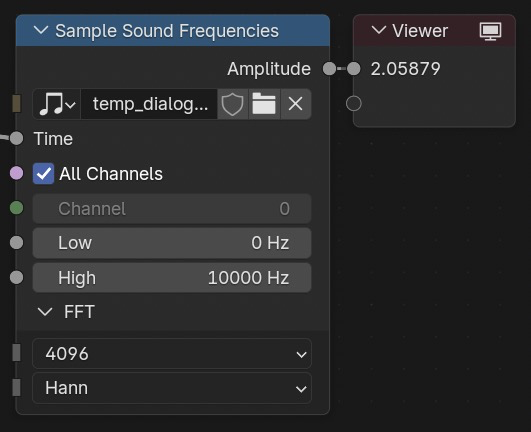
GEOMETRY NODES
Bevel and be well
A new node enters the chat: Mesh Bevel.
The long awaited power of detailed procedural control over the edges or vertices.
Effectors
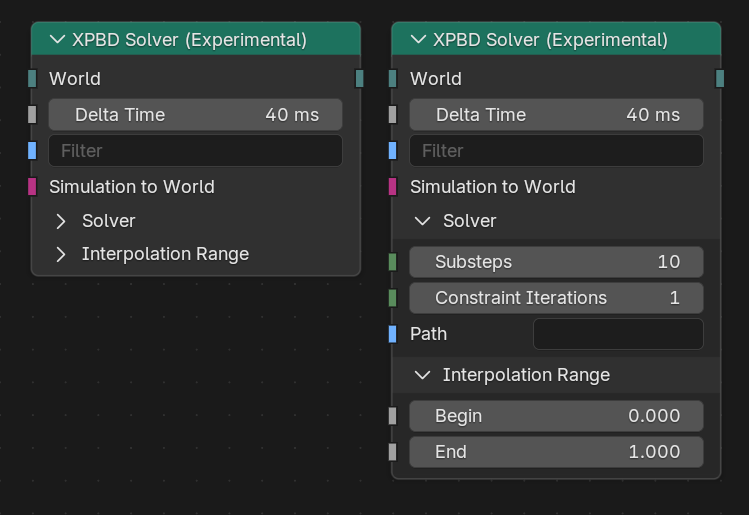
New node-based dynamics come with a bunch of built-in effectors for effortless gravity and/or surface collision application. In 5.2. LTS, three types of customisable effectors are available:
Tag&Filter
Tag-based filtering system for effectors is also here to easily determine which geometries they affect. Each simulated geometry can have multiple tags for the effector to specify which tags it should affect.
Physics: Solved
Reimagined, node based: Blender 5.2. LTS introduces a brand new procedural approach to physics for hair and cloth simulations.
What the community is creating with node-based physics
Vegetation interaction test render with the new #blender 5.2 Alpha Cloth Dynamics node in #geometrynodes and rendered with #b3d Cycles
— Kevin Lim Wanasili (@_cgman_) May 20, 2026
Animated hippo 3D model from Sketchfab pic.twitter.com/bBAeHrSO63
Testing a bit more of the new cloth simulation in #geometrynodes on Blender 5.2, really cool, optimized, and above all very customizable! #b3d #clothsim pic.twitter.com/lDMtM09m4d
— Wender Silva (@wendervfx) June 29, 2026
Cloth sim experiment #b3d #geometrynodes pic.twitter.com/p8B6fM90x9
— Cartesian Caramel (@Cartesian_C) June 17, 2026
all done :) i learned a lot about the new cloth solver nodes. these are exciting times! pic.twitter.com/WKuqbgl1IH
— ashlee! COMMS OPEN (@ashlee3dee) May 18, 2026
Bundle Up
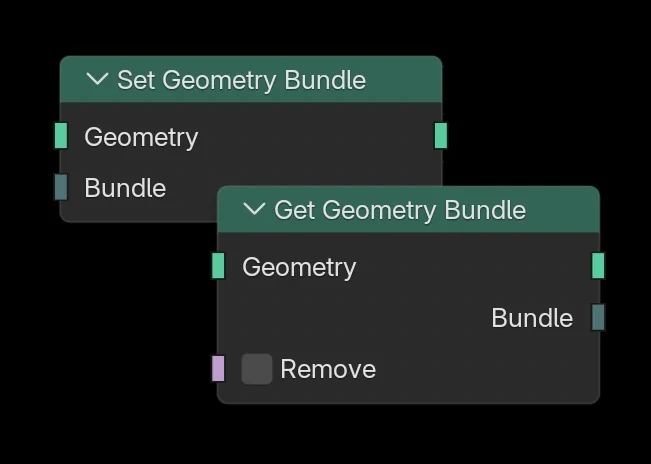
Blender 5.0 introduced the concept of bundles, which can now be attached to geometry to carry arbitrary data across modifier and object boundaries.
Use new Get Geometry Bundle and Set Geometry bundle nodes to unlock new workflows and possibilities.
CYCLES
Cached In
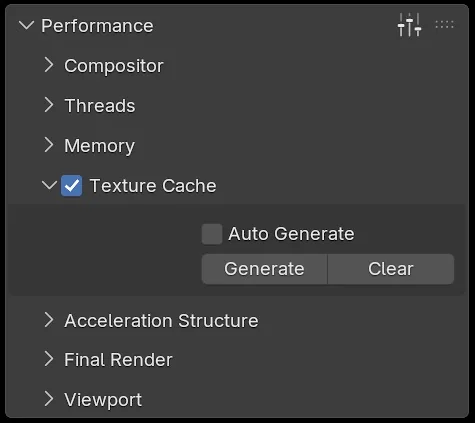
On scenes with many image textures, the new Texture Cache significantly reduces memory usage and startup time by automatically generating smaller, optimized texture files that load only the tiles and resolutions needed for rendering.
CYCLES
Easy Savings
One toggle, loads of memory savings.
Under Performance → Texture Cache, enable Auto Generate or click Generate. A corresponding .tx file will be generated for each image and automatically updated whenever the image file is modified.
Memory savings and performance improvements are highly scene-dependent. Using Texture Cache comes at the cost of a small rendering performance impact and increased disk space usage.

CYCLES & EEVEE
Paper-thin wall
When Thin Wall is enabled, the surface is treated as a slab with its layers mirrored around the base, and the thickness is assumed to be zero.
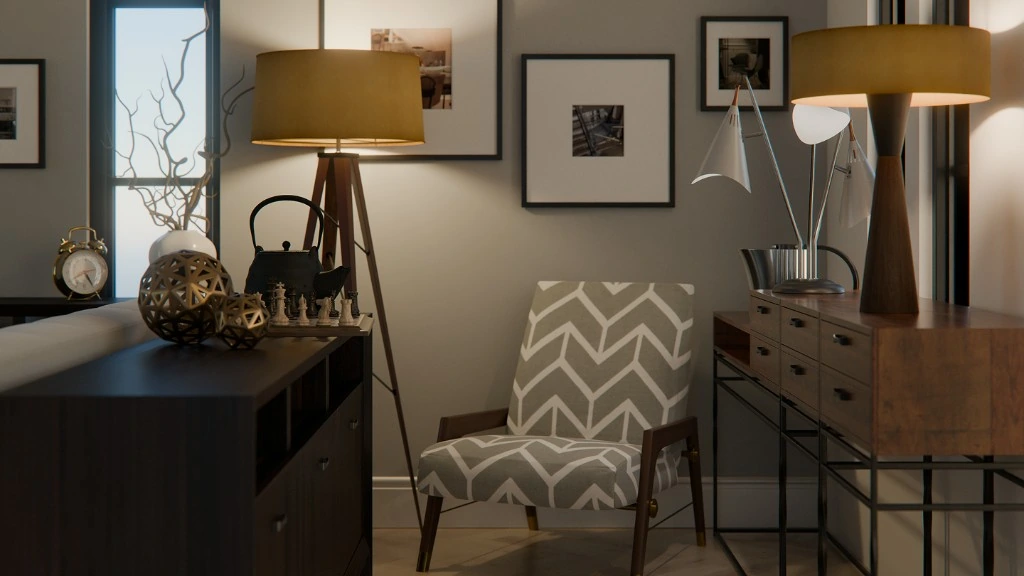
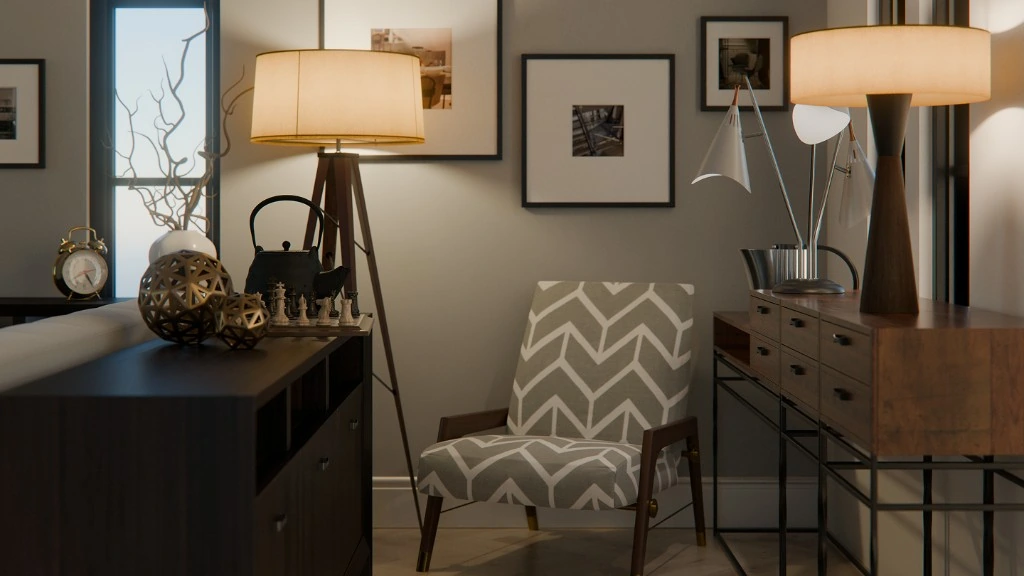
Render by Christopher 3D.
This new mode provides a more accurate approximation of thin transparent and translucent materials, combining reflection and transmission for thin glass surfaces, and diffuse and translucent scattering for thin subsurface materials.
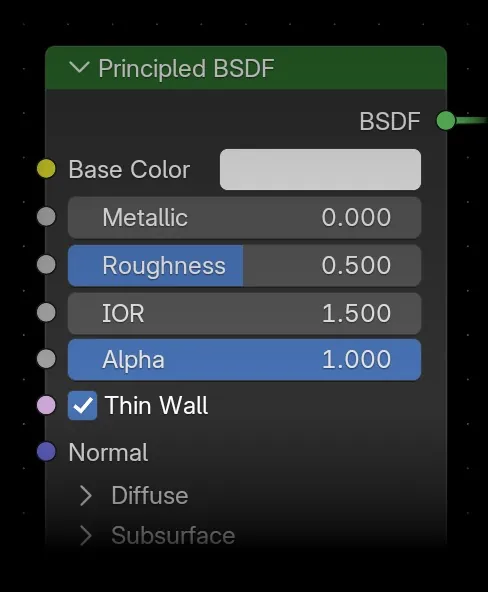


Render by Christopher 3D.
COLOR MANAGEMENT
Awesome in Space
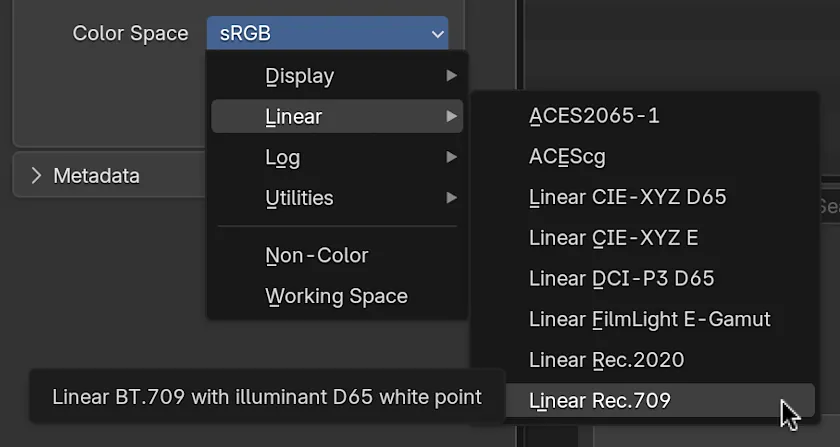
Organized color spaces into menus, adding new input color spaces for Apple, ARRI, Blackmagic Design, Canon, and Sony cameras, as well as support for Adobe RGB, common gamma values, and wide gamut textures.
More Cycles & Rendering
- Added: negative anisotropy support for Subsurface BSDF and Principled BSDF’s Subsurface component.
- The Random Walk radius scaling and anisotropy to albedo mapping adjustments for matching other renderers better.
- Added: Cast Shadows options for World.
- Geometry memory usage optimization and improved sync performance.
- Raycast Node: Access to custom attributes at intersection point.

EEVEE
Eevolved
What’s New
- 2x speed-up in instance-heavy scenes
- Reduced banding using dithering
- Removed limit of 8 attributes per material
- Support for Normal Map Base
- Added Raycast visibility toggle
- Added 1.5GB and 2GB Shadow Pool sizes
- Added Camera visibility for lights
- Plane Light Probes now support Blended materials and Shader to RGB
- Improved consistency rendering across platforms
- Added Anisotropic Filtering
Behind the Screen
The new Backface option under Screen Tracing controls how rays that intersect the back faces of visible geometry are handled.
When enabled, intersections with back faces are treated as valid hits instead of misses.
This can reduce light leaking when using screen-space global illumination, and lets you fine-tune the appearance of global illumination. It affects both Screen Space GI and Fast GI Approximation.

Both front and back faces contribute to global illumination (slider at 1.0)

Only front faces affect global illumination (slider at 0.0)

Use it for compatibility with old renders.
What Got Better
- Screen Space Raytracing overhaul
- Principled BSDF sheen accounts for Coat normal
- Critical Fast GI issues fixed
- Shadow visibility fixes
- Depth of Field bokeh fixes
- Shadow artifacts fixes
- Faster and less noisy Fast GI
- Fixdd light culling at shallow FoV angles
- Light render passes consistency with Cycles
- Motion blur fixes
- Volume shader compilation fixes
- Improved Refraction BSDF light evaluation
- Improved Vector Transform normals on non-uniform scale objects
- Mix node consistency with Cycles
- Subsurface Scattering indirect lighting fixes
- See all changes in EEVEE & Viewport

ASSETS ♥ ONLINE
Essentials On Demand
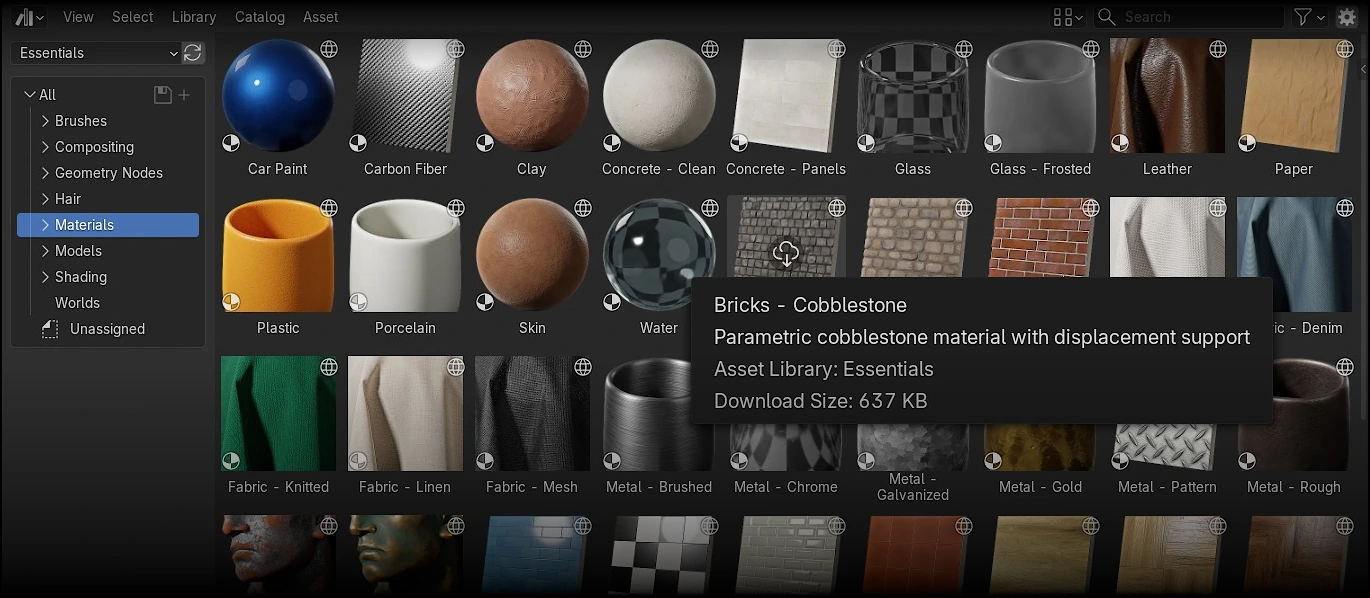
Dozens of new parametric materials, compositing effects, HDR world backgrounds, Geometry Nodes setups, and many more assets have been added to the Essentials library.
The best part? Blender isn’t any larger. These new assets are hosted online, ready for download whenever you need them.
Host Your Own
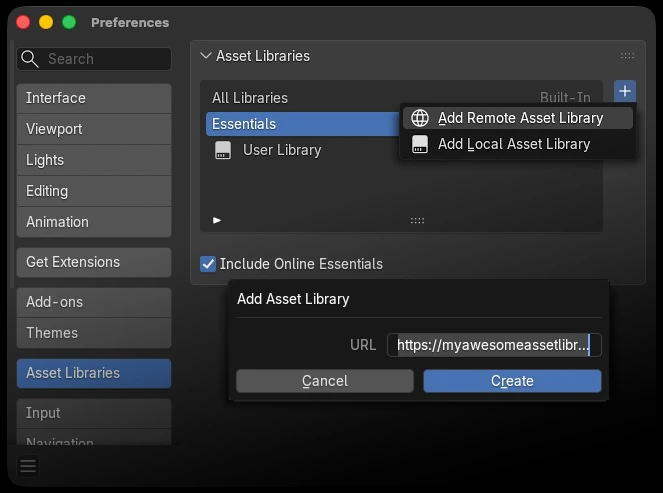
Need more? Host your own or add your favorite creator’s online asset libraries.
Smart indexing makes browsing thousands of assets a breeze.
Keep your assets up to date with a single click.
COMPOSITOR
New nodes, unlimited possibilities.
Do more in the Compositor with six new socket types supported: Matrix, Rotation, String, Object, Font, and Integer Vector.
Plus 35 new nodes all-around, from string manipulation to , many of which will already be familiar to Geometry Nodes users.
Instant Looks
Whether you’re after a realistic filmic finish or a hand-painted watercolor or oil painting style, the new compositing assets provide a quick starting point for a wide range of looks.
Additionally, you’ll find new utility node groups that can be used as building blocks or incorporated into your own setups.
- 3D to Screen Space: transform 3D coordinates from world to normalized camera space. The inverse is available as Screen to 3D Space. Use it, for example, to drive the Sun Beams position with a 3D object.
- Transform and Project: lower level generalised variation of 3D to Screen Space that inputs from Transform and Projection to compute coordinates.
- Project with Depth: transforms 2D coordinates with their corresponding depth into a 3D vector.
Gizmos Go Further
Compositor gizmos now support auto keying.
Transforming a gizmo will automatically insert keyframes, providing a direct way to animate compositing setups from the backdrop or the Image Editor, which now supports gizmos too!
As for the viewer gizmo, it now follows the image display offset, so handles stay aligned with the backdrop as you pan and zoom.
MORE IN COMPOSITOR
- Much more responsive interactive compositor.
- Switch nodes with a fixed condition (unconnected or directly connected to Group Input) now use lazy evaluation, saving execution time.
- The Distance Threshold mode of the Dilate/Erode node is now faster for relatively large sizes, with execution time independent of the size or inset inputs.
- The Group Output node now displays the total execution time of the node tree.
- Anisotropic sampling now works with Transform nodes and can be used for higher quality scaling down. Previously, it silently used Bi-Cubic sampling.
- The mask rasterizer now uses “Delaunay” tessellator by default providing robust support for overlapping regions.
- The interactive compositor now supports animation playback.
- The interactive compositor runs only when needed: fewer redundant executions, correct updates for referenced scene data, and no blocking from unrelated undo.
- File Extension checkbox in File Output node independent of scene render settings ‘File Extension’ checkbox.
- EEVEE only: the depth of Grease Pencil objects reflection in the viewport compositor depth pass.
- Blank Image node that returns a new image of a given size and constant color.
- Integer Vector sockets are now supported and used by default where possible.
- New Frame input in the Stabilize 2D node.
- Levels node got Minimum and Maximum outputs.
- Support for Object sockets and Active Camera, Camera Info, Input Object, Object Info nodes from Geometry nodes.
- Objects can be now dragged and dropped from the outliner to the node editor.
- The Node Editor now displays a render region when the backdrop is enabled.
- Socket value inspection support.
- Sockets representing pixel values now show pixel units.
- New masks can now be directly created from the Mask node.
- Support for Default Input Types.
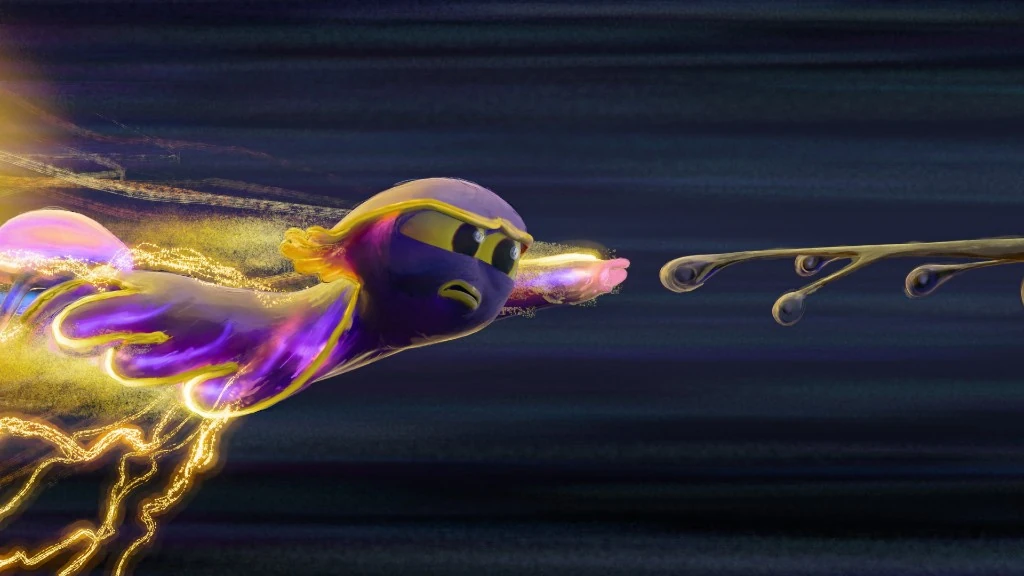
It’s a keeper.
The LTS in Blender 5.2 LTS stands for “long-term support”, meaning it will get fixes for up to two years, until July 2028.
GREASE PENCIL
Fill Good Ink.
Welcome the new Grease Pencil Delaunay fill algorithm. It creates exact geometry from boundary strokes, with automatic gap detection, inverse filling, zoom-independent results, and much faster performance.
Ready. Set. Go Random.
Dots and Squares line materials now feature Placement settings to control the distribution of shapes along a stroke.
Strokes are now generated at render time instead of as extra geometry, significantly improving performance compared to subdividing strokes with the modifier.
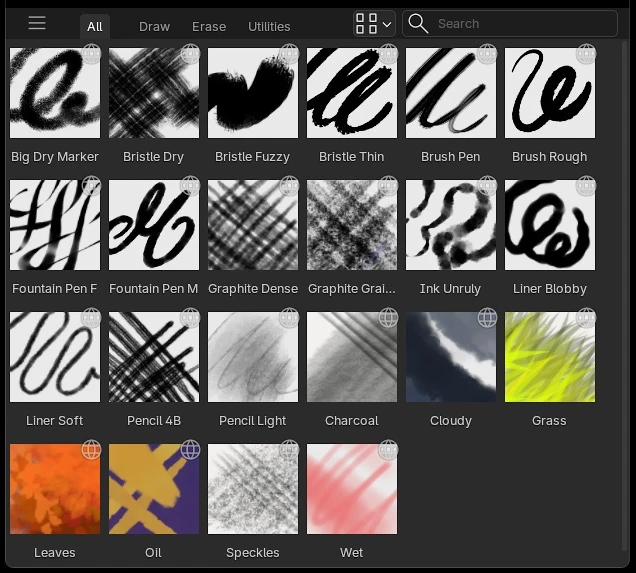
More Online
Don’t forget to enable the Online Essentials Asset library: which includes 19 new Grease Pencil brushes by Blender Studio artists and Daniel Martínez Lara.
Bundled brush assets got refreshed thumbnails as well as new material controls for Dots, plus settings updates for Airbrush, Ink Pen Rough and Pencil soft brushes.
Even more Grease Pencil
- Move to Layer operator now shows layers groups matching the layer tree structure
- Vertex Brush got blend modes support
- UI updates (icons) for Vertex Paint mode’s toolbar
- Shift + L now deselects strokes that are completely selected
- New Draw Tool settings for picking a curve type
- Eraser now uses the last activated eraser brush
- New Fill Strokes option lets generated strokes to carry fill material
- New Scene Units toggle in the SVG importer for scale the import in the scene units
- PDF and SVG exporters now support corner types export
ANIMATION
Loop Mood
Introducing Playback Loop modes!
- Infinite
- Stop at End Frame
- Stop at Start Frame
- Restore Frame
- Bounce
MORE ANIMATION & RIGGING
- Improved UI feedback when using Smooth and Cycles F-Curves modifiers
- Batch delete F-Curve modifiers (All, First, by Type)
- Ctrl+Click on the channel visibility setting in Graph Editor now isolates that channel
- Local View to isolate selected F-Curves.
- Normalize button click in the Graph Editor now performs a normalization even if Auto Normalization is disabled
- In-Between tools now available in Object mode.
- Copy Constraints added to Link/Transfer Data menu (Ctrl+L).
- Auto IK reverse behaviour now works with non-connected parent bones.
- New in Dope Sheet: an operator to select keys by type (Select → Select by Type)
- New operator in Armature Edit mode: use Duplicate and Rename to duplicate selected bones and perform a search/replace on the name.
- Only Insert Available user preference is on by default.
- Motion paths no longer update on the current frame during auto-keyed transforms.
- New Head/Tail slider for adjusting position along a bone when using Bone parenting.
- Additional Space, Align, Length, and Deform options in the redo panel for adding bones.
- New operator for selecting markers left or right of the playhead with [ and ] hotkeys.
- In Pose Mode, parent/child bone selection with hotkeys now works on all selected bones instead of just the active.
- Mirror bones no longer ignore transform lock settings.
- The In-Between tools now work with X-mirror in Pose Mode.
- Correct motion paths display when “Bake to Active Camera” is used with animated camera properties like Focal Length.
You can also share your own add-ons and themes!
MODELING
Stay In The Loop
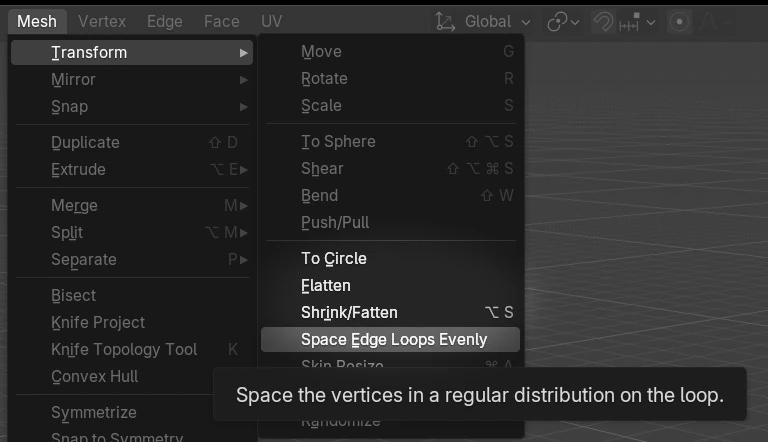
To Circle, Space Edge Loops Evenly and Flatten operators from the popular Loop Tools add-on are now available as native operators.
Rewritten from scratch in C++ for improved performance, while also fixing several corner-case issues.
MORE IN MODELING
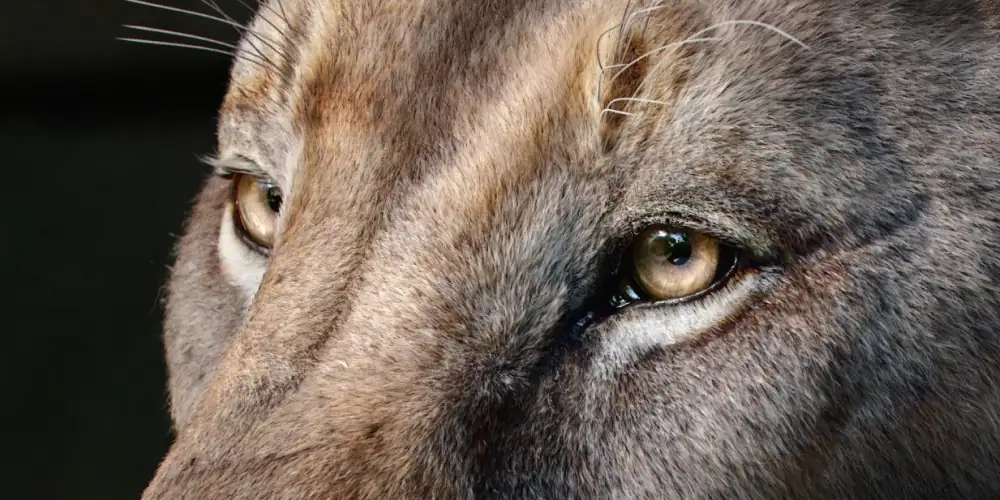
Get the artwork
Blender splash artwork source files are available for you to play with!
SCULPT
Not So Primitive
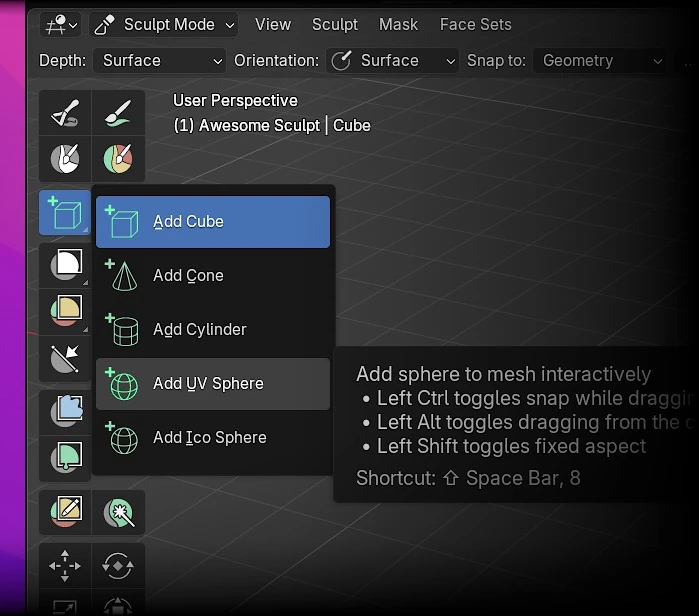
Sculpt mode expands its toolkit: drop primitives straight into sculpts with the Add Primitive tool.
Insert Cubes, Cones, Cylinders, UV and Icon Spheres while in Sculpt mode.
SCULPT
Scene! Project!
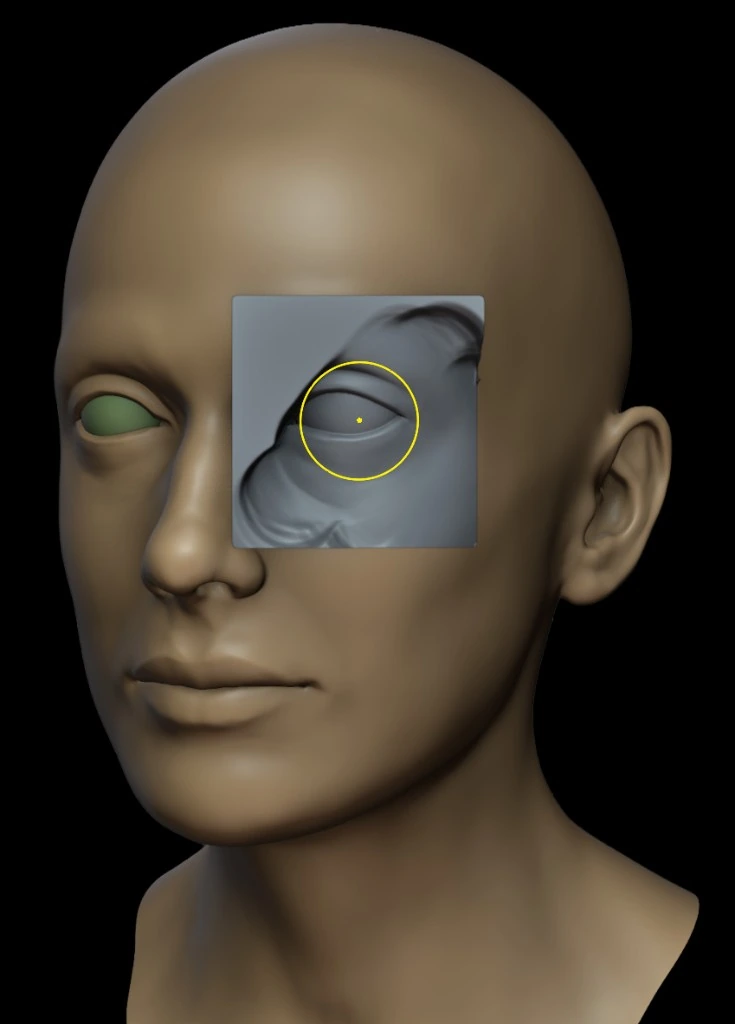
Wrap surfaces onto nearby geometry with the new Scene Project brush, and keep painted color intact through repeated voxel remeshing with a smoother color workflow along the way.
See the new Scene Project brush in action in this live demo by Daniel Bystedt.
Remesh, don’t wreck.
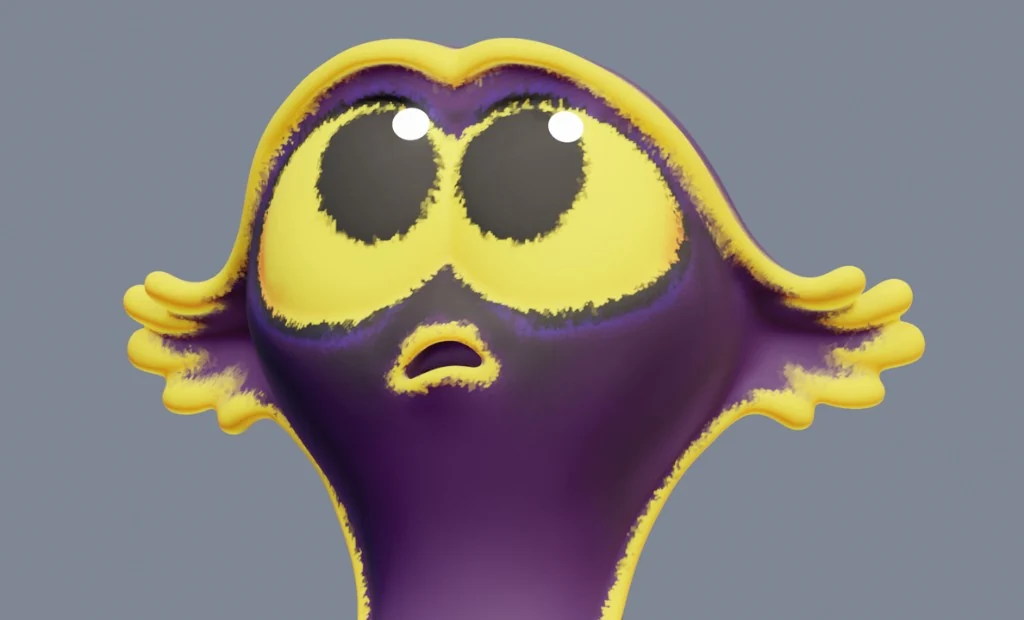

Vertex Colors preservation comparison between 5.1 and 5.2 LTS
EVEN MORE SCULPT & PAINT
VIDEO SEQUENCER
STACK, STYLE, SCOPE
The Video Sequencer mastering kit gets real in 5.2 LTS: share compositor effects as modifier assets, style titles and toggle modifiers per preview or render. All of that and more plus grading with HDR scopes.
COMPOSITOR + VSE
A new Compositor effect strip runs compositor node trees directly on the timeline with zero, one, or two inputs, plus an effect fader on the input group.
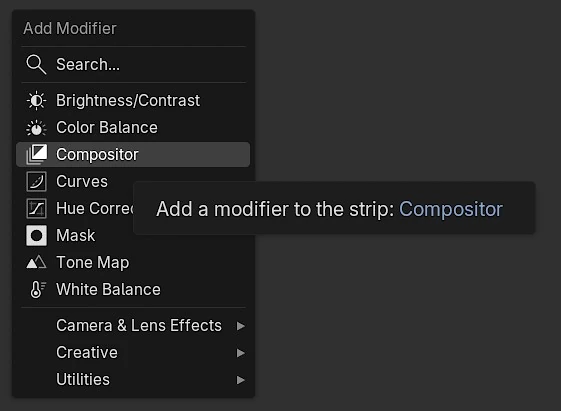
Strip modifiers now expose inputs in the panel, driven by the node group interface like Geometry Nodes. Save compositor node trees as Strip Modifier assets to add them from the Add Modifier menu later. In the modifier extras menu, you can hide the node group selector so shared assets feel like built-in modifiers.
Last but not least: modifiers and effects can now run on the GPU, a real solution needed for heavier graphs and large blurs.
Write in Style
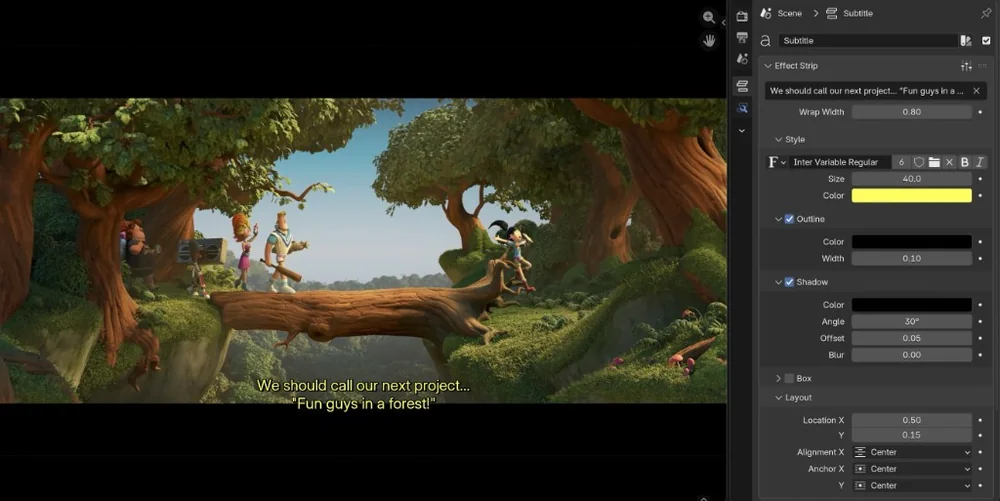
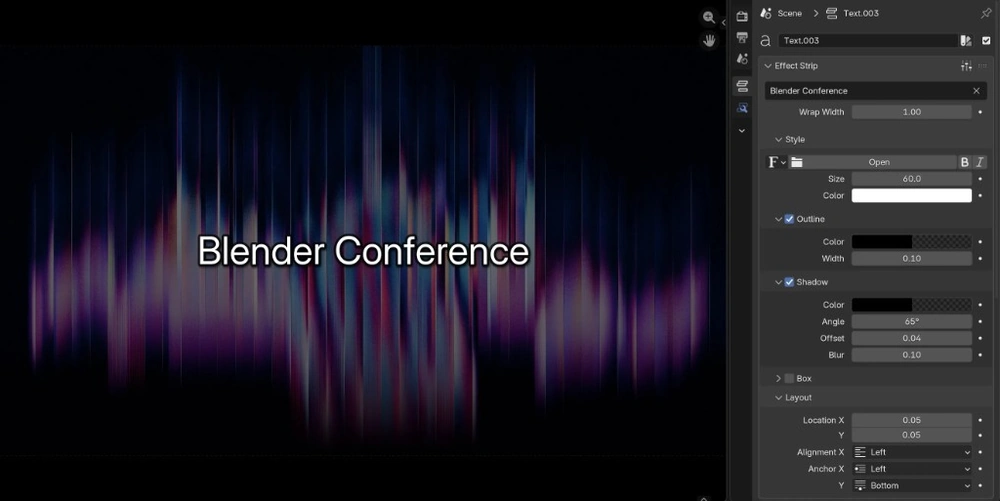
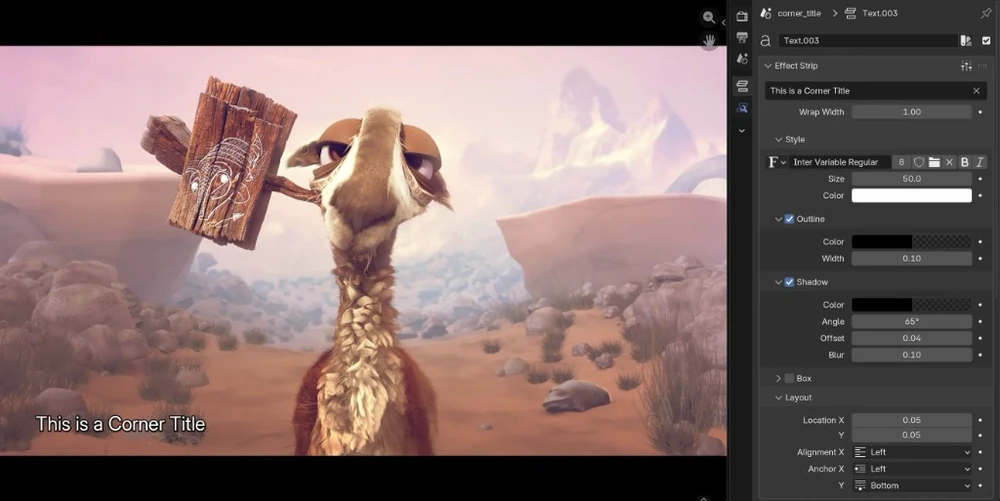
Text strips now support style presets.
Font, outline, shadows, layout, all settings in the Style panel are stored.
Three presets come built-in:
- Subtitle: classic movie subtitles.
- Main Title: big, centered text.
- Corner Title: smaller titles in the bottom-left corner.
Make Space
Line Spacing can now be adjusted in text strips relative to the font height, or in absolute pixels.
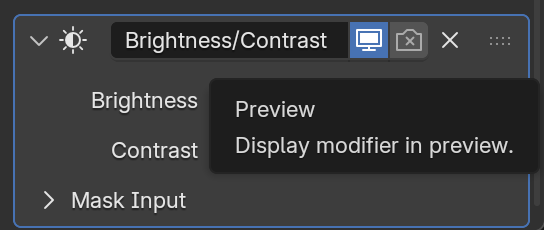
Now you see me, now you don’t.
Strip modifiers now have a preview visibility toggle just like object modifiers, so you can cut heavy processing from playback without touching the final export.
This also means that cached frames are kept in memory after rendering, making the next preview faster with the same result.
PERFORMANCE BOOSTS
THERE’S EVEN MORE SEQUENCER
- Stepping back a few frames while editing now feels much faster as Prefetch now loads five frames before the playhead.
- Timeline Strip thumbnails at start/end of strip are visible by default and also can be shown across the whole strip.
- Scene strips have a view layer selector, initially set to the scene’s default view layer.
- New override workbench world settings for tweaking background color for all scene strips at once.
- The Add menu shows “No other scenes” under Scene Strip when only the Edit scene exists in the file.
PLUS THESE
- Scopes now support HDR and wide gamut colour spaces.
- Optional scrubbing region on playback footer.
- Import adds all audio and video streams from video files.
- Render Audio operator now shows a real-time progress bar that can be cancelled.
- New: composition guides in VSE preview.
- Color strip size can now be set in raw pixels from the Strip Properties > Transform menu.
- More snap options for strip image origins (e.g. preview center).
- Unused mask inputs in compositor strip modifiers are now black and opaque instead of transparent.
- Sequencer colorspace transforms with semitransparent images now match the compositor Convert Colorspace node behavior.
-
Proxy builds no longer create
*.blen_tc, as timecode files functionality was removed.
USER INTERFACE
DETAILS MATTER
Long-term support comes with a long list of small UI improvements that make a huge difference for those who blend on daily basis.
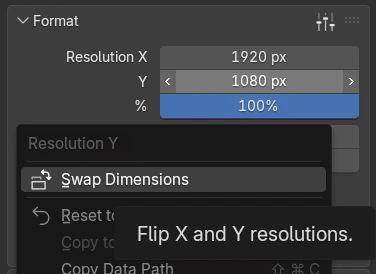
Do a Quick Flip!
Need portrait instead of landscape? Right-click Resolution X or Resolution Y and use new Swap Dimensions operator to quickly flip render dimensions.
OUTLINER
Active Focus
Turn on Scroll to Active in the Outliner to keep focus on the active object.
Elements inside collapsed Collections, and children of collapsed parents, are ignored in order to keep your Outliner tidy.
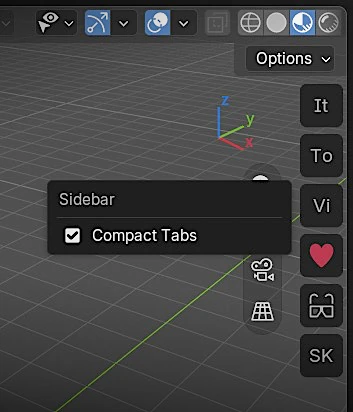
Cozy Sidebar
Fit more on your sidebar!
Compact mode turns the sidebar tabs into squares fitting the first two letters of the name, first two letters of each word, or even an icon.
Similar to bl_category for the panel name, define bl_icon and the ID of your icon.
Additionally, you can now click-drag to switch the active tab, and the sidebar is always visible even with a single tab.
PLUS ALL THESE USER INTERFACE IMPROVEMENTS
- New Preference: Save Modified Images prompt
- With right-click selection, File and Asset Browsers still open a context menu when right-clicking files/assets.
- When resizing areas, aligned edges no longer move together by default: hold Shift to move them as a group.
- When Developer Extras is enabled, the property’s icon ID is shown in the tooltip.
- Circle/Lasso Select order is consistent across editors.
- Frame the active element with Mouse Button 4 by default (alongside Numpad dot/comma).
- Auto-scroll the list when the mouse is near the edges during drag-and-drop.
- Invert sorting for root and nested list items.
- Invert the search filter to show items that don’t match.
- Navigate Tree View and Asset Shelf grid view with arrow keys.
- Numpad period brings the active item into view (tree and grid).
- New text-box widget for multi-line text input.
- New “link” widget type allows to style buttons as links (blue, underline, or custom via theme)
- Pan menus and popovers with the middle mouse button, just like in other Blender areas.
- Color widgets now allow direct paste of hex values.
- Sub-panels inside popovers can be collapsed.
- Number widgets: the unit is no longer part of the selected text, a unit hint appears after the value instead.
- New icons: FILTER_FILLED, DOWNLOAD, DOWNLOAD_DONE, PACKAGE_INDIRECT.
- Set Parent To menu shows icons for data/object type
- Make Group operator avoids type conversion on multi-connected inputs and duplicate output sockets.
- Ungroup operator adds proxy input and converter nodes so behavior stays the same after ungrouping.
- New Implicit Conversion nodes for fixed data-type conversion.
- New constant input nodes for Menu sockets and Font data-blocks in all node editors.
- Shader Editor welcomed Boolean, Integer, and Vector input nodes.
- Vector input nodes support 2D and 4D vectors.
- Hold Alt to affect all selected tree interface items.
- Multiple nodes can be now resized at once.
- More renaming directly inside nodes.
- Add dynamic sockets directly on nodes.
- String input nodes update evaluation on text edit.
- Float, Integer, Vector, and Integer Vector sockets now support Pixel subtype.
- Node Wrangler merge supports Integer Math nodes.
- Linked node groups moved to a submenu in the Add menu; indirectly linked groups hidden.
- Image drop into the World shading editor now creates an Environment Texture node instead of a regular Texture node.
- Searchable AOVs in the AOV Output node.
- 3D Viewport: cameras now have gizmo for orthographic scale adjustment.
- 3D Viewport: Brush popover Advanced section is transformed into collapsible sub-panel.
- Image Editor: UV Grid overlay options are now visible in all modes.
- Outliner: individual shape keys display.
- Outliner: filter panel is reorganized with sub-panels (the icon is removed).
- Animation: improved readability of Mirror menu for keys.
- Theme Editor: color, text style, and UI panels reorganization.
- After disabling Allow Online Access, choose to continue offline or allow internet access again.
- Linux (Wayland): key shortcuts work with non-Latin layouts when a Latin fallback layout (A–Z) is available.
- macOS 26+: new Liquid Glass application icon.
VIRTUAL REALITY
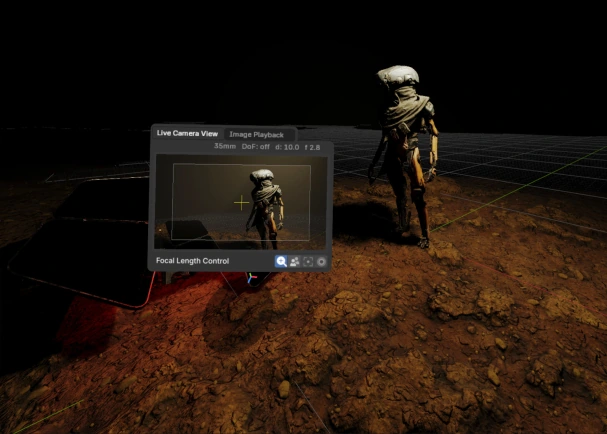
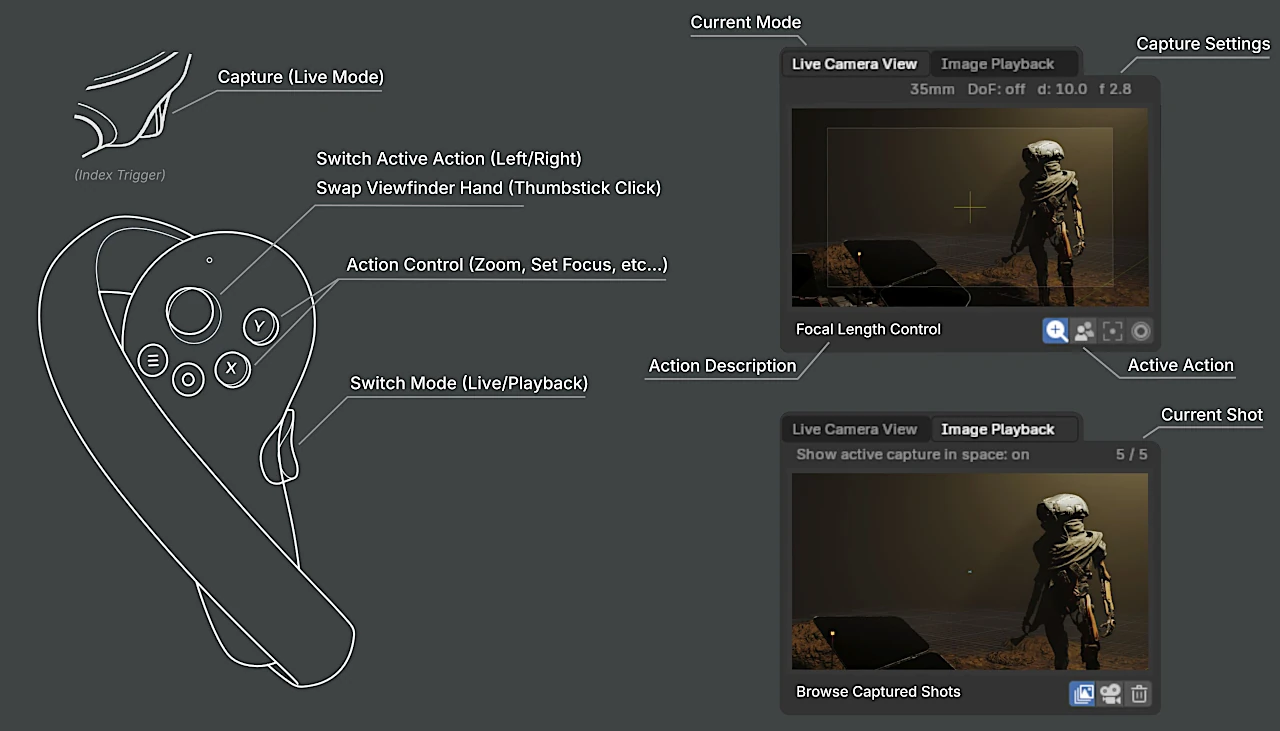
Great Scout
Jump straight into your 3D scene with Location Scouting!
Block camera vantage points and assess camera properties in VR with full 3D environment immersion.
Full Control
The VR Controller default bindings deadzone threshold was adjusted to provide a smoother user experience.
I/O
- Import support for object visibility from Alembic archives, including animated visibility as F-Curves.
- Animated camera data now imports as F-Curves.
- Subdivision meshes keep their original coordinates on import.
- Subdivision meshes rebuild correctly when Alembic changes their structure between frames.
- Point Cloud support.
-
Meshopt compression via
EXT_meshopt_compressionandKHR_meshopt_compression. -
Iridescence and dispersion materials via
KHR_materials_iridescenceandKHR_materials_dispersion. - KHR primitive attributes for the official glTF primitive attribute set.
- Errors raised by glTF Hooks now stop the export.
- Performance: inline material is used when possible.
- Performance: animation export enhancement by viewport disabling.
- Nodes are now sorted by name.
- Fixed: retrieve sockets by index instead of names when they are named the same.
- Fixed: scripts reloading crash.
- Fixed: Vertex Color export for a subset of materials only use case.
- UI filter for glTF Collections.
- Fixed: crash on import multiple custom attributes.
- Animation Pointer fixes.
BUT WAIT, THERE’S MORE
-
Geometry Nodes: modifier inputs and outputs are now RNA properties instead of custom
modifier["..."]keys. Scripts that set Geometry Nodes values the old way require updates. - Expanded image-buffer API: conversion between file formats, direct pixel access, and grey-scale/RGB/RGBA support.
-
New
bpy.data.all_idsiterator to loop over all data-blocks at once. -
New options for
bpy.data.file_path_foreachto expand UDIM tiles, image/volume sequences, and cache files (including Cycles texture cache). -
New:
gpu.init()to use the GPU in background mode (--background). -
Sculpt Mode automasking settings moved to
MeshAutomaskingSettingsonPaintandBrush. -
mathutilstypes (Vector, Matrix, Color, Euler) now support slice step (e.g.vector[begin:end:step]). - New functions to add, edit, and remove annotation strokes and points.
-
bpy.data.libraries.load()now exposes linked library blend-file paths. -
New:
Window.screenshotmethod to access screenshot pixel data without saving to disk. -
New:
UILayout.linkandUILayout.textboxfor styled link buttons and multi-line text in panels. -
Blender reports are now exposed as a read-only list on
WindowManager, with session-wide unique IDs. -
Grease Pencil: new functions
layer.layer_masks.addandlayer.layer_masks.removeto add/remove layer masks. -
Grease Pencil: new
fill_idandhide_strokeproperties to strokes in the high-level python API. - See all API changes.
Plus hundreds of bug fixes, code cleanups and refactors.
See the full list of changes.
CREDITS
Blender is a community project.
Learn more on how you can contribute to Blender.
List of developers who contributed to Blender 5.2 LTS and all-time contributors.
Splash artwork: Joanna Kobierska, based on a model by Ken Barthelmey.
Thin Wall renders by Christopher 3D. VR Location Scouting image by Daniel Bystedt.
Huge thanks to everyone involved! 🧡
The Blender team. July 14th, 2026